

Every great book begins with a blank page—and a 30-minute software update.
Your novel’s villain might be a corrupt king. It might also be a Word file named Final Final Version 7. Either way, you need a better plan.
The right writing tool can help you manage chapters, track revisions, develop characters, and prepare a clean manuscript for publication. The wrong one can leave you fighting file formats, missing features, and monthly fees.
This guide compares ten popular writing tools based on their interfaces, planning features, collaboration options, formatting capabilities, and costs. It helps both beginners and experienced authors choose software suited to fiction, nonfiction, and business books.
Liberty Book Writers helps authors turn ideas into complete books through professional book writing services, so we know why choosing the right workflow matters.
KEY TAKEAWAYS
- Choose software that fits your workflow and the book you’re writing.
- Use FocusWriter for distraction-free drafting, or Scrivener and Dabble to manage novels with many scenes and plot threads.
- Consider Atticus, Vellum, or Reedsy Studio for book layout and export.
- Use Google Docs for live collaboration and Microsoft Word for standard editing and delivery.
- Sudowrite can offer AI writing support, but review its suggestions carefully.
- Before paying, test the export options, backup features, file ownership, and device compatibility.
- Writing software can support your process, but it can’t replace research, revision, or a human editor.
How to Choose the Best Book Writing Software in 2026
Before paying for a writing app, decide what you need it to do. Writing a 60,000-word novel requires a different setup than producing a short business ebook.
Our guide includes a dedicated testing methodology section based on our qualitative research, encompassing user interviews, usability testing, and contextual inquiries, with a clear separation between our primary findings and secondary product documentation.
To ensure this guide provides honest, author-first recommendations, our evaluations combine firsthand qualitative usability testing with official developer documentation, release specs, and secondary technical research. We explicitly outline how each of the 10 software platforms was evaluated below.
1. Scope of Evaluation
Because authoring platforms range from local native applications to cloud-based suites and dedicated formatters, tools were evaluated under specific test conditions:
- Hands-On Tested Tools: Key writing and manuscript organization platforms—including Scrivener, Atticus, Ulysses, Dabble, Microsoft Word, Google Docs, Sudowrite, and FocusWriter—were directly installed, configured, and used by our team to outline, draft, and edit active sample manuscripts during live writing sessions.
- Documentation & Desk Research: Hardware-restricted applications (Vellum, evaluated on native macOS frameworks) and cloud-integrated publishing suites (Reedsy Studio) were thoroughly analyzed using direct developer documentation, official feature roadmaps, community feedback, and verified technical specifications alongside hands-on export checks.
2. Qualitative Study & Participant Overview
To understand how different writers interact with these 10 platforms, we conducted structured qualitative usability evaluations:
- Participants: A total of 8 authors and editors participated in the testing process, comprising 3 fiction novelists, 2 non-fiction authors, 2 indie self-publishers, and 1 professional copyeditor.
- Format: Single-blind, 1-on-1 moderated usability sessions paired with semi-structured qualitative interviews focused on UI distractions, cloud stability, and manuscript navigation.
3. Evaluation Tasks & Criteria
Participants performed standardized, real-world authoring tasks across each evaluated platform:
- Manuscript Setup & Outlining: Creating chapter hierarchies, corkboard notes, scene cards, and character profiles (e.g., using Scrivener, Dabble, and Ulysses).
- Drafting & Focus Mode: Writing text utilizing distraction-free interfaces, tracking daily word count goals, and leveraging AI generation or editing tools (e.g., FocusWriter, Sudowrite, Google Docs).
- Collaboration & Live Editing: Testing track-changes, commenting, and real-time co-authoring capabilities (e.g., Microsoft Word, Google Docs, Reedsy Studio).
- Formatting & Publishing Export: Generating publication-ready EPUB, MOBI, and PDF files for distribution on platforms like Amazon KDP and IngramSpark (e.g., Atticus, Vellum, Reedsy Studio).
Each tool was rated across four core criteria:
- Interface & Focus Environment: Clutter-free writing spaces, customization options, and distraction-reduction features.
- Organization & Long-Form Management: Ability to manage high word counts, multi-chapter structures, and research notes.
- Export & Formatting Versatility: Ease of compiling clean, error-free digital and print-ready files.
- Cross-Platform Syncing & Stability: Cloud backup safety, offline functionality, and OS compatibility (macOS, Windows, Web, iOS).
4. Limitations of the Study
- Sample Size: Qualitative findings represent detailed feedback from a focused group of 8 authors, designed to reveal workflow trends and usability bottlenecks rather than statistically representative quantitative metrics.
- Platform Constraints: Native OS tests were conducted on standard macOS and Windows 11 environments. Mac-exclusive tools like Vellum and Ulysses were tested on native hardware, while cross-platform performance was evaluated on standard desktop browsers.
Look for these five features:
- Planning tools help you organize scenes, chapters, characters, research, and notes.
- Collaboration lets editors, coauthors, and beta readers review your work.
- Formatting prepares your manuscript for editing, print, or ebook export.
- Backup and version history protect your work when a revision goes wrong.
- Total cost includes subscriptions, formatting tools, and any software you still need.
A low price means little if the tool cannot export your finished book. Test a sample chapter before moving an entire manuscript into a new app.
10 Best Book Writing Software for Authors in 2026
The right book-writing software can make every stage of authorship more manageable.
From capturing early ideas to organizing chapters, refining prose, and preparing a polished manuscript, the best tools support your creative workflow and publishing goals in 2026.
For your convenience, we have provided a table to assist you in identifying the main writing software options for Drafting, Planning, and Formatting.
1. Microsoft Word
Microsoft Word remains the industry standard for document processing across corporate and publishing landscapes. Major traditional publishers, literary agencies, and freelance editors expect manuscript submissions in DOCX format, making Word a default necessity for many authors.
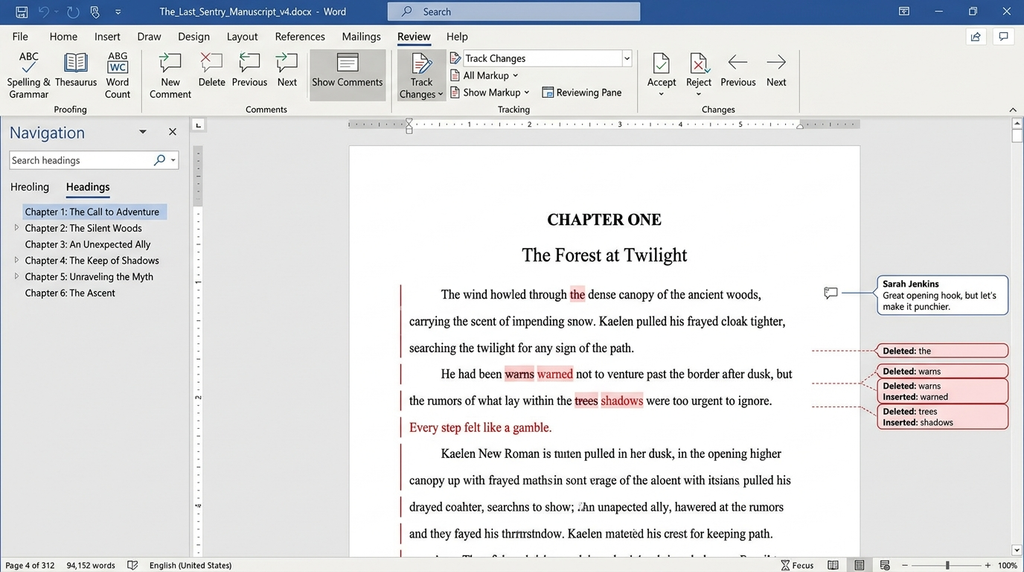
The platform offers deep typographical controls, advanced macro automation, and extensive track-changes functionality that keeps proofreading workflows organized across large editorial teams. However, Word was never designed specifically for long-form narrative structuring.
Navigating an eighty-thousand-word manuscript in a single vertical file can quickly become cumbersome, and heavy files with embedded assets often lead to performance lags.
Despite these structural limits, Word’s universal file compatibility and ubiquitous presence across desktop and cloud environments make it an essential baseline tool for authors who want seamless compatibility with external editors and publishing houses.
User interface
Word uses a familiar ribbon with menus for editing, layout, references, and review. Its Navigation pane helps you move between headings in a long document.
Planning and organization
Heading styles, page breaks, comments, and document sections help keep a manuscript in order. Word lacks built-in storyboards and character databases, so large fiction projects may need a separate planning tool.
Collaboration
Word supports comments, tracked changes, and real time coauthoring through shared files. Keep the manuscript in OneDrive when working with an editor or coauthor.
Formatting
Word gives you control over fonts, margins, page numbers, headers, footnotes, and tables of contents. It prepares manuscripts well, but professional ebook layout may need another tool.
Price
Word for the web has a free option. Microsoft 365 Personal lists at $99.99 per year in the United States, while standalone Word has a separate purchase option. Check the official Word plans before buying.
Verdict
Choose Word when editors, publishers, or clients expect DOCX files. It is less suited to authors who need advanced plot planning inside one app.
2. Google Docs
Google Docs revolutionized modern document management by bringing a full writing environment to the web browser with real-time cloud synchronization.
Writers no longer need to worry about manual saves or losing progress during hardware crashes, as every keystroke saves instantaneously to cloud storage. Its main strength is frictionless collaboration.
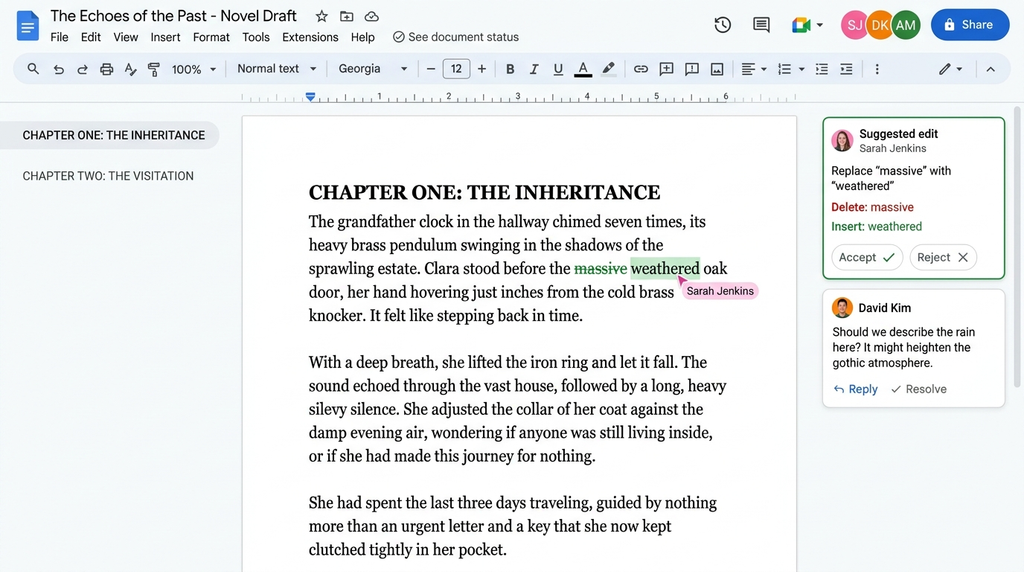
You can share a secure access link with co-authors, alpha readers, or copyeditors, allowing multiple people to comment, suggest edits, and revise text simultaneously without version control confusion.
While Google Docs offers effortless cross-device availability and a clean, zero-cost entry point, it lacks dedicated plotting tools like corkboards, character index cards, or scene splitters.
While very large manuscripts can occasionally introduce minor browser-based input lag, it remains the top choice for writers prioritizing real-time teamwork and easy cloud accessibility.
User interface
The clean layout makes it easy to start writing. Headings, document tabs, and search tools help you navigate longer projects.
Planning and organization
You can arrange chapters with headings, split work into separate documents, and keep research in Google Drive. It lacks built in character sheets and scene boards.
Collaboration
This is its strongest feature. Multiple people can edit the same document, leave comments, suggest changes, and review version history. You can control who can view or edit the file.
Formatting
Docs supports headings, page numbers, tables, images, and document styles. You can export a manuscript to DOCX or PDF, but it lacks the dedicated book-typesetting tools of specialist software.
Price
Personal use is free with a Google account. Business plans cost extra. Review the official Google Docs page.
Verdict
Google Docs is a strong choice for authors who need easy feedback and access from different devices. Use a separate tool if you need advanced plot control or print ready book design.
3. Atticus
Atticus entered the publishing market as an all-in-one desktop and browser platform designed specifically to bridge the gap between drafting and professional book formatting.
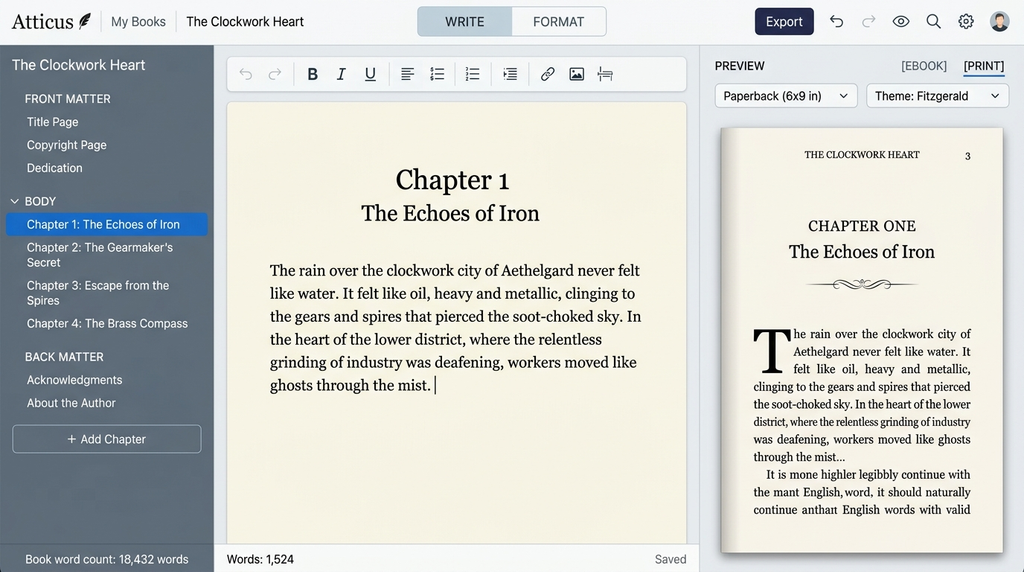
Built by authors for authors, it eliminates the need to buy separate software for writing and interior layout. The interface gives you a clean, distraction-free environment to write your chapters while simultaneously rendering a real-time preview of your formatted interior on the side.
You can quickly switch between dozens of pre-built chapter header designs, fine-tune drop caps, and handle trim size settings without any coding knowledge. Atticus syncs seamlessly across Windows, Mac, Linux, and Chromebooks, giving writers full flexibility across operating systems.
It offers an efficient, cost-effective workflow for self-publishing authors who want to produce distribution-ready print PDFs and EPUB files without paying expensive formatting fees.
User interface
The editor combines a writing area with book layout controls. Authors can work through their manuscript and check how its design looks.
Planning and organization
Atticus supports book projects and chapter based writing. It is not as deep as Scrivener for tracking complex plot threads, research files, or detailed story notes.
Collaboration
Do not choose Atticus mainly for live coauthoring. Authors who need frequent shared edits should test their review workflow or use a collaborative editor.
Formatting
Its main strength is producing ebook and print layouts. You can adjust chapter styles, fonts, front matter, and other book elements before exporting your files.
Price
Atticus lists a one time price of $147, with no recurring subscription. The purchase includes ongoing updates, according to its official website.
Verdict
Atticus is a strong option for self publishing authors who want writing and formatting together. It makes less sense if your main need is team collaboration or advanced story planning.
4. Scrivener
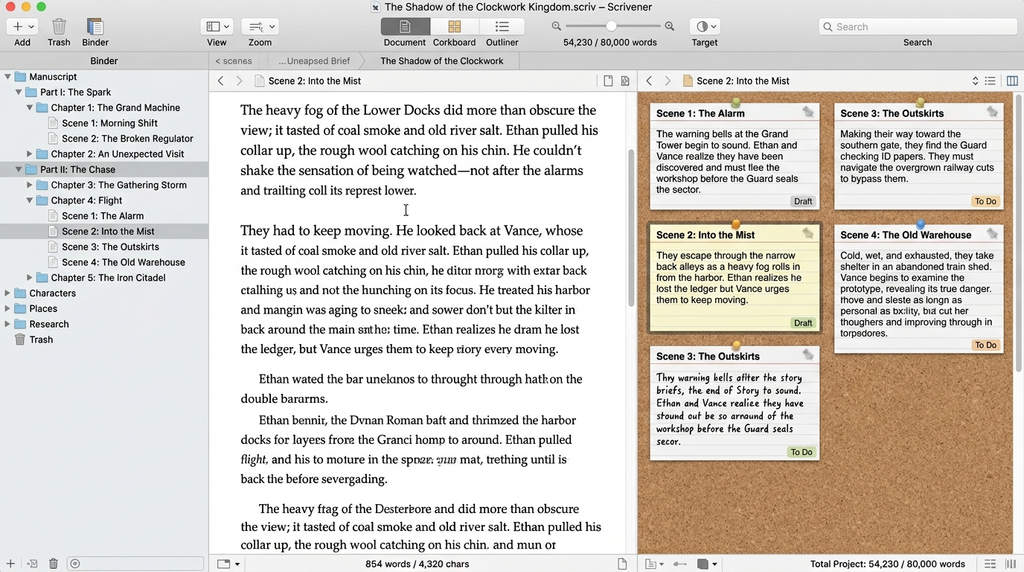
Scrivener stands as the heavy-duty organizational powerhouse engineered specifically for complex long-form writing projects and heavy research management.
Unlike standard word processors that force you into one long continuous document, Scrivener breaks your manuscript into endless nested chapters, sub-scenes, and research notes within a single project binder.
You can view your story structure through digital corkboards, rearrange plot points using visual index cards, and track detailed metadata like character arcs, locations, and narrative status. The split-screen editor lets you reference background research papers or outline notes directly alongside your active drafting pane.
While the software has a noticeable technical learning curve because of its extensive compile settings and deep customizability, it gives fiction novelists, non-fiction historians, and academic writers complete control over large, detailed manuscripts from early concept to final export.
User interface
Its binder, editor, and research views keep project material close to the draft. New users may need time to learn the layout.
Planning and organization
The binder, corkboard, and outliner let you arrange chapters and scenes. You can attach notes, track word counts, label sections, and move scenes without rebuilding the whole document.
Collaboration
Scrivener is not designed for live, multiuser editing like Google Docs. Writers can share compiled files, but a team needs a clear system for merging revisions and syncing projects.
Formatting
The Compile feature exports manuscripts to formats such as DOCX, PDF, and EPUB. It offers strong control over output, though authors should inspect exported files before publishing.
Price
The standard desktop license costs $59.99 for macOS or Windows. The iOS version costs $23.99, with a discounted desktop bundle available. See official Scrivener pricing.
Verdict
Scrivener is one of the strongest choices for novels, research heavy nonfiction, and books with many sections. It rewards careful setup and does not replace a collaborative editing system.
5. Sudowrite
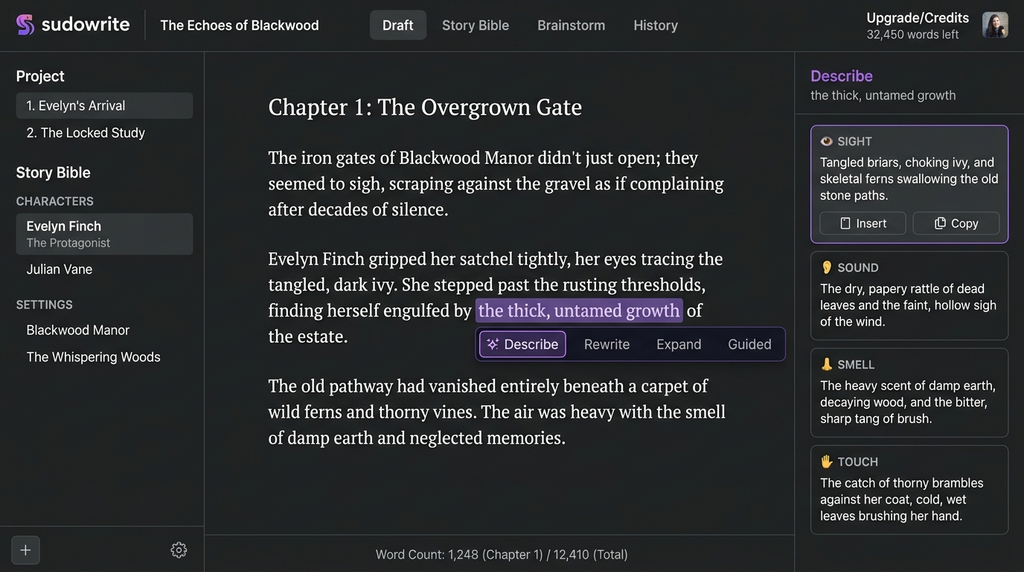
Sudowrite introduces generative artificial intelligence directly into the creative writing process, acting as an interactive digital brainstorming partner for authors.
Built on advanced large language models, it helps writers overcome writer’s block by providing real-time scene expansions, sensory details, character dialogue suggestions, and plot twist options based on your existing text. You can highlight specific paragraphs to rewrite tone, expand descriptions, or generate fresh narrative beats without leaving your document canvas.
The interface keeps these generative panels neatly positioned beside your main manuscript, allowing you to accept, reject, or edit suggestions instantly.
While it doesn’t replace core narrative planning or human editing expertise, Sudowrite is a powerful productivity booster for authors who want to speed up drafting, generate creative ideas on demand, and overcome structural plotting hurdles during intense writing sprints.
User interface
The interface combines manuscript work with AI tools for generating and revising text. Writers should test the workflow before relying on it for an entire book.
Planning and organization
Its story tools help develop characters, settings, plot points, and continuity. Authors still need to check whether new suggestions fit the original outline and earlier chapters.
Collaboration
Sudowrite focuses on AI supported writing rather than shared live editing with a coauthor. Use a separate tool when several people need direct control over one manuscript.
Formatting
Its strength lies in creative development, not final print design. Check the current export options and prepare your final layout in a dedicated book formatter if needed.
Price
The Hobby and Student plan costs $19 per month or $10 per month when billed annually. Professional costs $29 monthly or $22 per month on annual billing. Max costs $59 per month or $44 per month when billed annually. See official plan details.
Verdict
Sudowrite can help when you need fresh story ideas or revision options. Treat its output as a draft, not a final authority. Check facts, voice, logic, and originality before keeping generated text.
6. Reedsy Studio
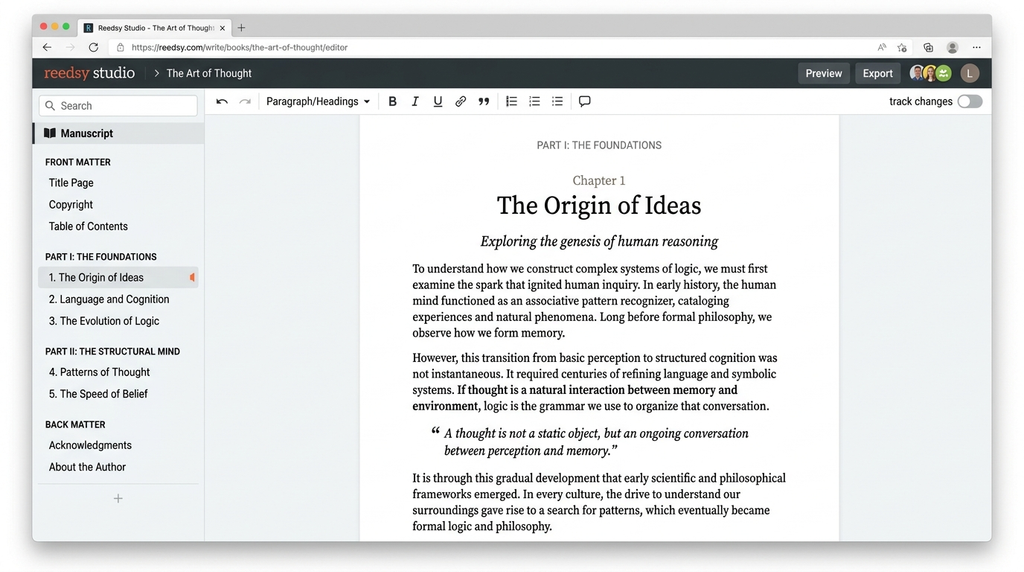
Reedsy Studio offers a sleek, web-based writing and manuscript production tool built directly into the broader Reedsy publishing ecosystem. Designed for minimalist focus, it strips away unnecessary toolbars, ribbons, and menus to leave you with an uncluttered drafting canvas that keeps your focus on word production.
The left navigation panel lets you break your book into structured chapters, front matter, and back matter with simple drag-and-drop controls.
As you draft, the app automatically handles underlying typesetting rules, ensuring your manuscript adheres to standard publishing layouts. You can easily invite professional editors, proofreaders, or co-authors to review your work and leave targeted comments directly within the document.
User interface
Its book editor keeps chapter writing and manuscript structure in one place. The browser based setup also works on mobile browsers, though there is no dedicated mobile app.
Planning and organization
You can organize a book, set a writing goal, track basic statistics, and use boards for notes and outlines. Advanced planning tools depend on the paid add ons.
Collaboration
Studio supports sharing and review features for working with other people. Check access settings before giving an editor permission to change your main manuscript.
Formatting
Its core tools export EPUB files and print ready PDFs. This makes it useful for authors who need a clean book interior without learning a complex layout program.
Price
Core writing and formatting features are free. The Craft add on costs $4.99 per month and the Outlining add on costs $7.99 per month. See official Reedsy Studio pricing.
Verdict
Reedsy Studio is an excellent starting point for budget conscious authors. It offers a useful mix of drafting and book output, though writers who need deep project controls may prefer Scrivener.
7. Dabble
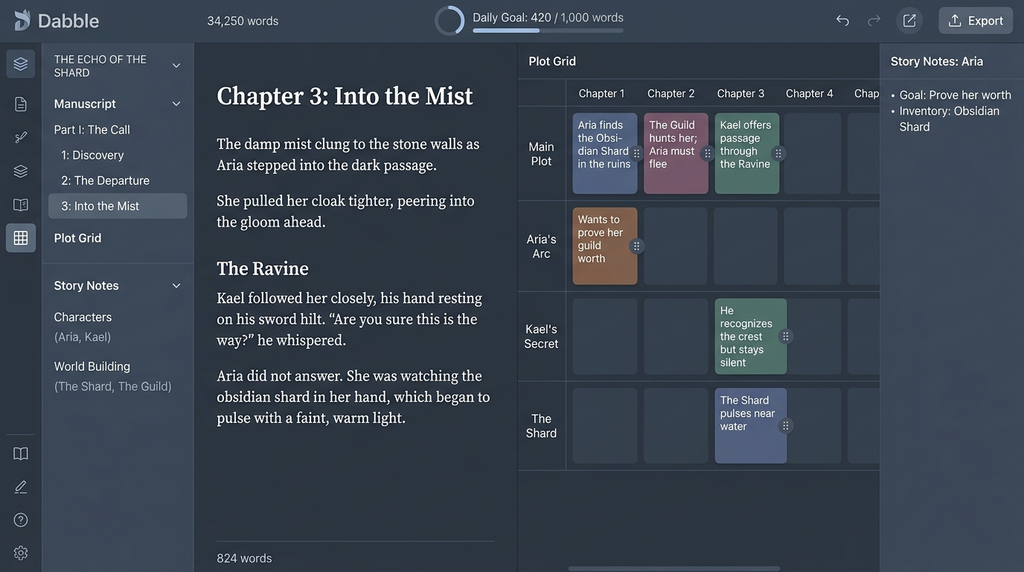
Dabble provides a modern, cloud-based writing application that balances the organizational depth of complex manuscript software with the clean simplicity of modern web apps. It runs effortlessly inside web browsers and offers dedicated desktop apps that keep your files backed up and synced automatically across all your devices.
The standout feature is its intuitive Plot Grid, which allows authors to visually map out character arcs, subplots, and story beats across chapters in a clean matrix layout.
Moving scenes around automatically updates your manuscript structure, preventing continuity errors during heavy revisions. Dabble also includes built-in goal tracking that calculates daily word counts based on your target deadline.
It offers a smooth, approachable workspace for authors who want structured plotting tools and automated cloud backups without dealing with a steep technical learning curve.
User interface
Dabble provides a writing area with tools for planning and tracking progress. Its cloud based setup lets you work across supported devices.
Planning and organization
Plot Grid, story notes, and character profiles help writers track scenes and story details. Word count goals and statistics also help authors measure progress.
Collaboration
Dabble offers coauthoring and writing group sharing on supported plans. The number of collaborators depends on the plan, so check the limits before inviting a team.
Formatting
Dabble helps you organize and write your manuscript. Check its current export options and consider a dedicated formatter if you need detailed print or ebook design.
Price
The Writer plan lists at $19 per month, and the Author plan at $29 per month. Dabble also offers a higher tier and different billing options. Review the official pricing page.
Verdict
Dabble is a sensible option for novelists who want built in plotting, character notes, and progress tracking. It is less suitable for authors who want a free tool or a one time purchase.
8. Ulysses
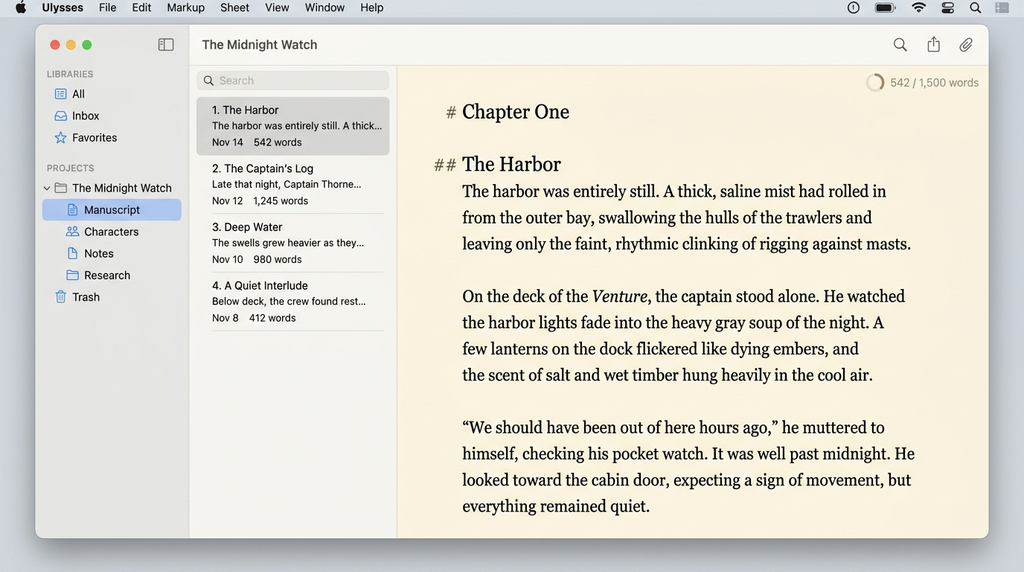
Ulysses is an elegant, Markdown-based writing application developed exclusively for the Apple ecosystem across Mac, iPad, and iPhone. It organizes all your writing projects, essays, and full-length novels into a single unified library backed by seamless iCloud synchronization.
The software uses Markdown syntax, allowing you to apply formatting like headings, italics, and links without ever taking your hands off the keyboard to click menu buttons.
You can break long books into small text sheets, set flexible daily word targets, and attach research images or notes directly to individual sections. Its distraction-free focus mode highlights your active sentence while dimming surrounding text to maximize typing concentration.
Ulysses is the premier choice for Apple users who want a clean, minimalist drafting environment that flows effortlessly between desktop computers and mobile devices.
User interface
Its uncluttered editor keeps attention on the text. Writers who prefer a minimal workspace may find it easier to use than a feature packed word processor.
Planning and organization
Folders, groups, keywords, writing goals, and attached research help organize larger projects. Its structure works well for articles, essays, and book drafts.
Collaboration
Ulysses syncs work through iCloud across supported Apple devices. It is not a full live coauthoring tool, so shared editing may require exporting files to another app.
Formatting
You can export to DOCX, PDF, EPUB, HTML, and plain text. Export styles give you control over the output without forcing you to format every page as you write.
Price
US pricing is $5.99 per month or $39.99 per year. Student pricing may also be available. Check the official pricing page.
Verdict
Ulysses works well for Apple users who value focus, clean organization, and flexible exports. Windows users and teams that need live collaboration should look elsewhere.
9. Vellum
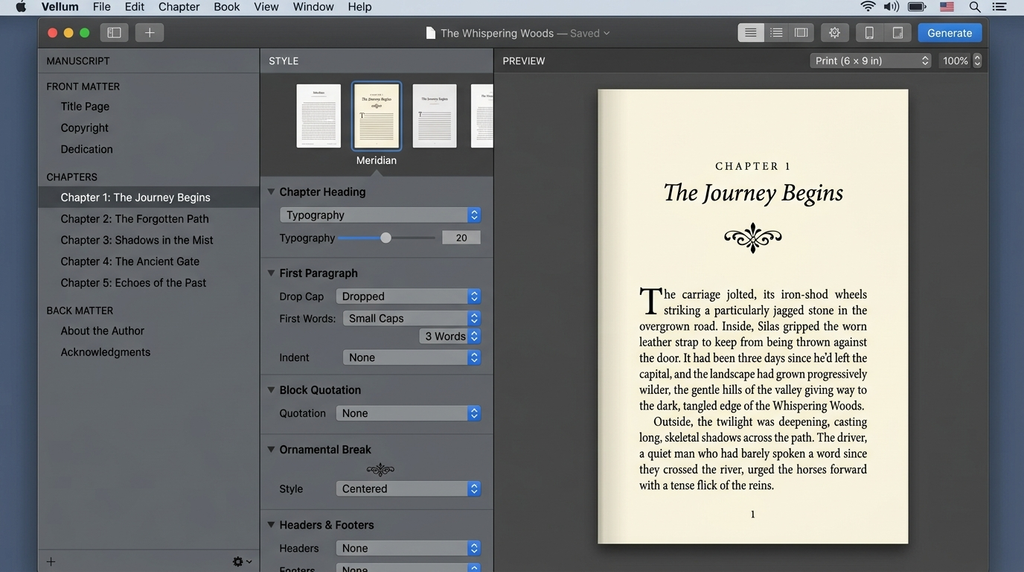
Vellum is a specialized, Mac-only application widely regarded as the gold standard for professional book interior layout and digital formatting. It takes raw text imported from word processors and transforms it into breathtaking, store-ready print paperbacks and ebooks in a matter of seconds.
The interface features a live preview window that shows exactly how your book will render across real Kindle e-readers, iPads, paperbacks, and smartphones as you make changes.
You can instantly apply curated typography themes, customize decorative chapter headings, add ornament dividers, and format automatically calculated headers and footers with single clicks.
Although Vellum operates solely on macOS and carries a higher upfront cost than general tools, its lightning-fast export speed and flawless visual output make it an indispensable production asset for serious self-publishing authors and publishing agencies.
User interface
Vellum offers visual book previews and layout choices. Authors can check how a book looks before generating its final files.
Planning and organization
Its job is book layout, not deep plot planning. Draft and organize the manuscript elsewhere, then bring the text into your formatting workflow.
Collaboration
Vellum is not designed for live collaborative drafting. A writer and editor should finish their review process before producing the final layout.
Formatting
It creates styled ebooks and print books, with options for chapter headings, typography, and book elements. You can update the project and regenerate the files when you fix a typo.
Price
Vellum Ebooks costs $199.99, and Vellum Press costs $249.99. Both are one time purchases. The software requires macOS 13 or newer and is available only for Mac. See official Vellum details.
Verdict
Vellum suits Mac users who publish books and care about interior design. It is costly for first-draft writers, and Windows users need another option.
10. FocusWriter
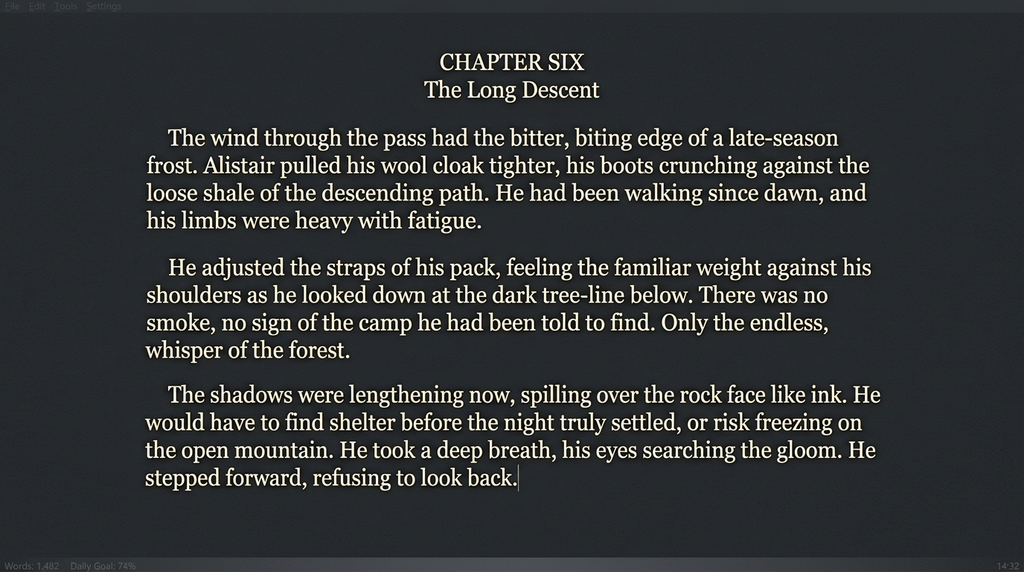
FocusWriter approaches long-form text creation with a single clear mission: eliminating every digital distraction between the writer and the blank page. The software covers your entire monitor with a seamless, fully customizable background image or color, hiding your operating system taskbar, desktop clutter, and notifications.
All navigation menus, word count statistics, and file controls remain completely hidden off-screen until you hover your mouse pointer over the screen edges.
It includes functional writing features like daily word count targets, visual goal progress bars, timed writing session alarms, and authentic typewriter sound effects to maintain drafting rhythm.
FocusWriter saves files in plain text and rich text formats, keeping resource usage light on your machine. It is the ideal lightweight drafting tool for authors who want an offline workspace focused purely on raw word output.
User interface
The app uses a full screen writing space with menus that appear when needed. You can change themes, fonts, and backgrounds to fit your preferences.
Planning and organization
Daily goals, writing statistics, and multiple open documents help track work. It does not provide a full novel outline, character database, or story timeline.
Collaboration
FocusWriter has no built in live coauthoring system. Share files through another service if an editor or writing partner needs to review your work.
Formatting
It supports basic text writing and spell checking. It is not a specialist tool for preparing a polished EPUB or print ready book.
Price
FocusWriter is free and open source, with builds for Windows, macOS, and Linux. Check the official project page for downloads and updates.
Verdict
FocusWriter is worth trying if you need a simple place to draft without distractions. Move to another tool when you need deep planning, feedback, or book formatting.
Need Professional Guidance on Your Next Book?
Drafting your story is only the first step on your road to publication. Professional editors, ghostwriters, and layout specialists turn raw manuscripts into market-ready releases.
Work with our team to get expert support across writing, editing, and distribution. Connect with Liberty Book Writers to start your project.
Best Book Writing Software Comparison Table
The right tool depends on the task you need to complete. Compare the main use, price model, and chief limitation before choosing.
| Software | Best use | Starting cost in US dollars | Main limitation |
| Microsoft Word | Editing and standard manuscripts | Free web version | Limited story planning |
| Google Docs | Team editing and feedback | Free | Basic book layout |
| Atticus | Writing and self publishing layout | $147 one time | Limited live collaboration |
| Scrivener | Long books and novels | $59.99 desktop | Learning curve |
| Sudowrite | AI supported fiction writing | $19 monthly | AI needs human review |
| Reedsy Studio | Free writing and formatting | Free core tools | Advanced features cost extra |
| Dabble | Novel planning and drafting | $19 monthly | Subscription required |
| Ulysses | Focused writing on Apple devices | $5.99 monthly | Apple only |
| Vellum | Ebook and print formatting | $199.99 | Mac only |
| FocusWriter | Distraction free drafting | Free | Few book production tools |
Prices are listed in US dollars and can change. Check each official website before making a purchase.
Writing Software for Writers
The best writing setup is the one that removes problems from your actual workflow. Do not pay for story maps if you write short nonfiction books.
Don’t settle for a basic editor if your novel has twelve point-of-view characters and a complex timeline.
For most new writers, these choices make sense.
- For a first book on a tight budget, start with Google Docs or Reedsy Studio. Both let you begin without buying a full writing suite.
- For a book with an editor, use Google Docs for shared feedback or Word for tracked changes and DOCX delivery.
- For fiction and long nonfiction, choose Scrivener when you need detailed organization and flexible chapter order.
- For AI-supported writing, test Sudowrite on a small section first. Check each suggestion against your voice, plot, and research.
- For self-publishing, consider Atticus or Vellum when you reach the layout stage.
If you plan to hire a custom fiction book writing service, ask which file format the writer will deliver, how revisions work, and who owns the final manuscript. These details matter more than a flashy list of features.
Software for Novels Specifically
Novel writing brings extra demands. You may need to track point of view, character goals, scene order, clues, locations, and changes across several chapters.
Scrivener offers a binder, corkboard, and outliner. Dabble adds Plot Grid, character profiles, and progress tools. Bibisco, covered below, focuses on character and story development. yWriter organizes chapters, scenes, characters, items, and locations. Sudowrite helps generate ideas and explore new directions with AI.
Each tool solves a different problem. A plot planner will not automatically improve your dialogue, and an AI assistant will not catch every continuity error. You still need to check dates, names, character motives, and cause-and-effect between scenes.
Before moving your entire novel, create a test project with three chapters. Add notes, change the order, export the manuscript, and reopen it. This simple test can reveal missing features before they disrupt a full draft.
So, What’s the Verdict? What’s the Best Writing Software?
There is no single best writing app for every author. If you want total organizational power, buy Scrivener. If you want fast, stunning book formatting without hiring a designer, get Atticus or Vellum.
If you need a completely free workspace to co-write with friends, Google Docs and Reedsy Studio get the job done right away.
Match the software to your specific technical bottlenecks, then stick with it until you type the final word.
Need Help Turning Your Idea into a Book?
Liberty Book Writers helps authors develop book ideas, prepare manuscripts, and move toward publication with our best ghostwriting services. Start with a clear goal and choose the support your project needs.
Explore Liberty Book WritersEndnote
Choosing the right software forms the foundation of your publishing journey, but software alone cannot market your manuscript. Modern authors must navigate complex publishing ecosystems, metadata standards, and digital storefronts to reach real readers. Professional Book Publishing Services can help authors prepare their manuscripts, navigate the publishing process, and bring their books to market.
Selecting top Self-Publishing Platforms for Authors allows you to upload your files, manage global distribution networks, and retain control over your royalties. When you combine high-performing tools with clear strategy, you transform raw drafts into market-ready books.
Our team at Liberty Book Writers handles everything from developmental editing and cover design to full multi-platform distribution. Take complete control of your creative publishing path today, launch your novel across global markets, and build a lasting, profitable career as a published author.
Frequently Asked Questions
The best book writing software depends on whether you need drafting, planning, or page design. Scrivener organizes manuscripts, while Atticus and Vellum format books for publication.
For software for writing a book at no cost, try Reedsy Studio or Google Docs for drafts and exports.
Many authors use Microsoft Word because editors know its DOCX format and its review tools support revisions.
In addition, Many published authors use Word for research and writing, while Google Docs and Scrivener also have loyal followings. The best choice often depends on genre and workflow.
The best writing software for authors depends on the job. Microsoft Word suits tracked edits and standard delivery, Scrivener manages long projects, and Atticus or Vellum handles book layout.
Professionals should choose a tool that protects drafts, exports clean files, and fits an editor’s process.
The best software for writing a book won’t define a 90/10 rule. People use the phrase in different ways, often to divide time between drafting and other tasks. Treat it as a guide, not a publishing standard, and leave room for research, revision, and editing.
Many book writers draft in Microsoft Word or Google Docs because both support everyday writing and editing. Scrivener suits manuscripts with many scenes or research notes.
If you need free book writing software, start with Google Docs or Reedsy Studio, then test export before committing.
Scrivener is the best software to write a book when you need to manage scenes, notes, and research in one project.
Word is better for tracked changes and standard DOCX handoffs. For the best software for book writing, choose based on your workflow, not popularity.
Ready to Turn Your Manuscript into a Bestseller?
Great software helps you write your story, but professional publishing builds your career. Let our team of expert editors, ghostwriters, and layout specialists turn your draft into a polished, market-ready book that stands out on global bookshelves.
Partner with our team today to streamline your editing, formatting, and distribution process.